







Subtle cues, ranging from an asset download to a drop in product usage, are the earliest signs of opportunity and risk. Acting swiftly and appropriately on these buyer signals is the key to connecting with buyers when they are most ready to engage, and intervening before revenue is lost.
OLD WAY (SELLING AS AN ART) | NEW WAY (SIGNAL-BASED SELLING) | |
Relied on broad demographics and assumptions
| Buyer Targeting | Uses real-time data signals to understand buyer intent and behavior
|
Based on gut feeling or basic criteria like job title
| Lead Prioritization | Prioritizes leads based on predictive analytics and real-time engagement signals
|
Took a "spray and pray" approach with cold calls and generic emails
| Sales Engagement | Personalizes engagement triggered by specific buyer actions or signals
|
The winning teams put AI to work recognizing and acting on buyer signals in real-time across the customer lifecycle.
This guide will show you how to uncover the signals already in your revenue ecosystem and layer AI where it drives the most value. You’ll also see how Salesloft transforms raw signals into targeted, coordinated actions.
Want a PDF of this guide? Fill out the form on the right to receive a copy in your inbox.
What are buyer signals?
Signals are behavioral or data-driven cues that indicate buyer intent, risk, or readiness to purchase. They can be explicit, such as a prospect filling out a form, or implicit, like a shift in a customer’s product usage over time.
Salesloft sees signals as the currency of GTM. Like cash flow in finance, they reveal the health and potential of your pipeline. But raw signals are like raw currency: they must be activated quickly and thoughtfully to unlock compounding value. Common signal categories include:
- Product usage: Adoption thresholds, license utilization, or feature activation
- Lifecycle milestones: Contract renewals, free trial expirations, or onboarding progress
- Behavioral engagement: Event attendance, email engagement, or content downloads
- Risk alerts: Rising support tickets, inactive opportunities, or leadership churn
With the right tools, you can also build custom signals, defined by triggers unique to your business, such as regional trends or a product champion leaving the company.
Signals come from the data sources you already have, like CRMs, marketing automation platforms, customer success tools, product analytics, and third-party intent providers. The challenge isn’t in collecting the data; it’s in knowing how to centralize, prioritize, and deliver it to the GTM team in enough time to make a difference.
Buying groups navigate ~800 interactions with vendors throughout the buying journey. Buyers engage in a wider variety of activity (e.g., reading white papers, meeting analysts, attending webinars) with the vendor they ultimately choose.
Signal-based selling improves the buyer experience, too. As soon as you capture definitive buyer intent, you can deploy automated, signal-triggered actions, paving the way for proactive engagement and hands-off self-service options that guide buyers through the funnel on their own terms.
According to Gartner's 2024 B2B Buyer Survey, 61% of B2B buyers state that they prefer rep-free sales experiences.
Salesloft turns signals into seller-ready actions
Salesloft eliminates the distance between buyers’ behavior and the seller’s response by combining AI agents with your existing systems. Instead of pushing siloed data into fragmented reports and dashboards, Salesloft integrates with your tech stack and provides real-time signals directly to AI agents that assist GTM teams where they work.
Key capabilities for signal-based selling include:
- Salesloft Rhythm: Prioritized, daily workflows that organize tasks based on live signals, helping reps focus on the accounts and buyers most likely to convert.
- Salesloft Plays: Automations that launch tasks the moment a signal occurs. For example, a customer hitting a usage threshold can instantly trigger an upsell Play, or a support escalation can alert a renewal rep to intervene.
- No-code iPaaS integration: Native connections to CRMs, product analytics, CPQ, and support systems make it easy to bring valuable buyer and product data into Salesloft without waiting on IT sprints.
With no-code integration, your team can sync first-party data into Salesloft almost immediately, aligning attributes with signals and enabling cross-system workflows. When the right data flows seamlessly into seller workflows, there’s no question of which account to prioritize or what next-best action to take.
Everyone is looking for prioritization — how can I get my sellers to focus on the things that drive revenue. With signals, I know there is a reason for me to reach out to the customer for a meaningful conversation.
How to operationalize signals in Salesloft
RevOps and GTM leaders can develop a signal-activated strategy in Salesloft following this customer-proven process:
- Identify your signals: Start by mapping all potential buyer behaviors and actions in your systems. Ask yourself what outcome you are looking to drive with each signal, and understand where this data lives, how frequently it’s updated, and how relevant it is to seller engagement.
- Connect data sources: Determine whether Salesloft has a native connection to your iPaaS (such as Tray.io, Workato, or Zapier), third-party platform (such as Hubspot, Zoominfo, or Seismic). If not, you can build an integration layer using Salesloft APIs.
- Configure Salesloft: Map third-party data attributes to Salesloft fields, ensuring they’re relevant to sellers' workflows.
- Create Salesloft Plays: Define the actions to take when data changes in a field, such as triggering a personalized email after a website visit or notifying an account owner of new high-priority support tickets.
- Maintain and refine workflows: Data, signals, and actions evolve over time, so establish a process to test, monitor, and refresh integrations and Plays regularly.
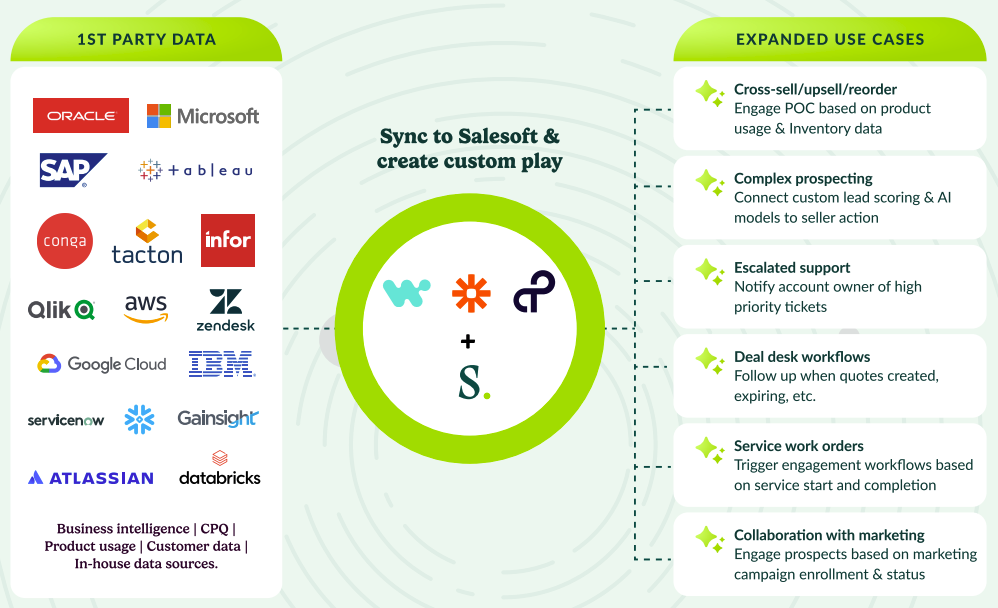
6 practical use cases of signals in action
1. Deal desk workflows
Surface risks early and ensure no deal gets stuck at the finish line. Signals like quote creation or expiry can automatically trigger follow-ups from both the deal desk and the account owner—keeping high-value deals moving without relying on reps’ memories or Slack nudges.
2. Complex prospecting
Cut through the noise of lead lists. Connect custom lead scoring and AI models directly to seller workflows so reps engage top-priority accounts with confidence and timing that actually converts.
If you use signals in Salesloft, you’re fishing where the fish are and taking action on the back of buyer behavior.
3. Collaboration with marketing
Close the loop between marketing and sales. When a buyer engages with a campaign or asset, Salesloft can automatically trigger a personalized Cadence that mirrors their interests.
4. Escalated support
Strengthen relationships and preserve renewals by setting support case object signals to begin a Cadence workflow or feeding high-priority support tickets directly into a Salesloft Play. Salesloft can route alerts directly to the account owner or CSM so someone reaches out proactively, not reactively, as soon as a key account files a support ticket or shows signs of frustration.
5. Cross-sell, upsell, and reordering
Turn product adoption into pipeline. When product usage hits key thresholds, Salesloft can auto-trigger Plays for cross-sell, upsell, or renewal so your team never misses a moment to grow an account.
6. Service work orders
Reinforce relationships by setting the start or completion of a service to trigger Plays for feedback, follow-ups, or upsells that keep your brand top of mind post-sale.
The most sought-after solutions focus on sales and revenue analytics, pipeline generation, and enhanced deal visibility.
Make signals the currency of your GTM strategy
Failing to capture signals is leaving money on the table. Sellers want to be data-driven, but they are drowning in noise and don’t know what to act on. Signal-based selling gives them the targeted information they need to drive effective, repeatable, and predictable motions.
Connecting to first-party data through iPaaS and centralizing signals in one platform removes the guesswork and closes the gap between insight and action. With Salesloft to capture, prioritize, and operationalize buyer signals, RevOps and GTM leaders can align their teams around the moments that matter most and make it easier to follow the money.
Next steps
- Audit your signal strategy: Which signals are you capturing, and which are being ignored?
- Connect your data: Bring your first-party data to Salesloft using iPaaS or native integrations.
- Talk to our team: Contact our experts today for help operationalizing signals in your GTM strategy.
Fill out the form on the right to get a PDF copy of this complete guide in your inbox.